Skip to content
Vehicle data made useful

OBD2 & Vehicle Diagnostics

Turn dashboard uncertainty into structured information. Explore diagnostic tools designed to read compatible vehicle data, interpret trouble codes, review live parameters, and help you approach maintenance with better context.

Read the Signal Access compatible diagnostic trouble codes and vehicle information.
Add Context Review available live data instead of relying on a warning light alone.
Plan the Next Step Use diagnostic information to support a more informed maintenance conversation.
Customer Support Available 24/7
Shipping Free on All Products
Delivery 3–5 Business Days
Returns Free Within 30 Days
Diagnostic thinking

A warning light is the beginning of the question.

Vehicle diagnostics work best as a sequence: identify what the vehicle reports, add operating context, then use that information to decide what should be inspected next. A scanner is a visibility tool, not a replacement for proper diagnosis.

01

Signal

Start with the information the vehicle makes available: stored or pending codes, warning status, readiness information, and compatible sensor data.

Identify what is reported
02

Context

A code describes a detected condition or circuit-related issue. Vehicle behavior, service history, operating conditions, and live information can provide the context needed to investigate.

Look beyond one code
03

Decision

Use the information to plan an inspection, discuss the issue with a qualified technician, or decide whether additional testing is appropriate before replacing parts.
Diagnose before replacing
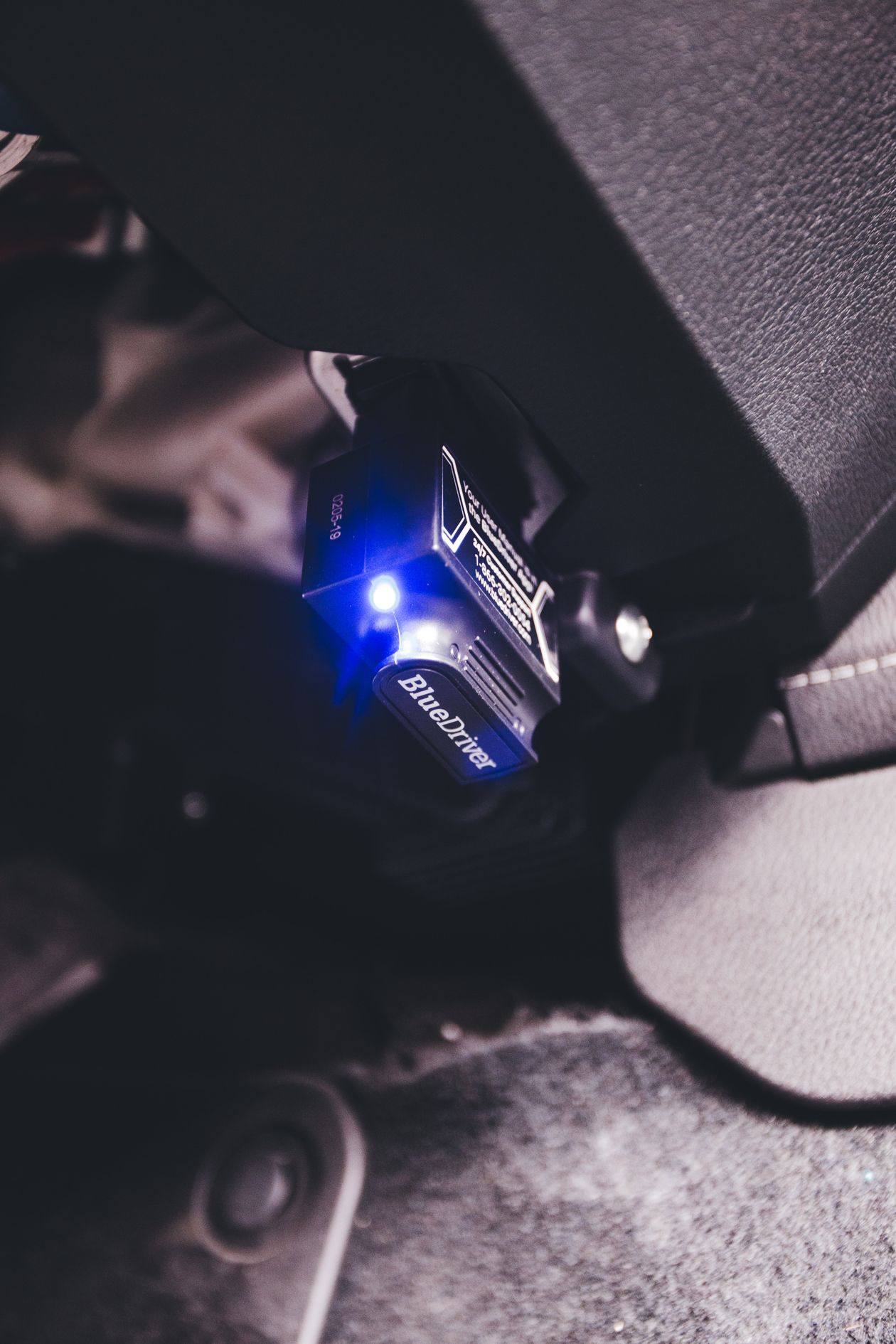
Bluetooth OBD2 diagnostic scanner connected inside a vehicle
Connected diagnostic hardware OBD2 interface in a real vehicle
Start at the port

One connection can open a much clearer view of the vehicle.

A compatible OBD2 scanner connects to the vehicle's diagnostic interface and can provide access to standardized information supported by the vehicle and the scan tool. Depending on the hardware and software, that may include trouble codes, freeze-frame information, live parameters, monitor status, vehicle identification data, and additional manufacturer-specific functions.

  • Read compatible trouble codes

    Use reported codes as starting points for investigation rather than automatic part-replacement instructions.

  • Review live vehicle data

    Available sensor values can help add operating context while the vehicle is being inspected.

  • Separate information from assumptions

    Diagnostic data can narrow the search, but physical inspection and appropriate testing may still be necessary.

  • Choose the depth you need

    Basic readers prioritize code access, while more advanced scan tools may support deeper data and additional vehicle systems.

Diagnostic visibility

Understand what a capable scan tool can bring into view.

Feature availability depends on the vehicle and diagnostic tool, but these are the core information areas drivers commonly evaluate when choosing OBD2 hardware.

Trouble Codes

Read compatible stored, pending, and supported diagnostic trouble-code information reported by the vehicle.

Fault visibility

Live Data

Review available real-time values to add operating context while evaluating a reported condition.

Dynamic information

Freeze-Frame Data

On supported vehicles, capture operating information recorded around the time certain faults were detected.

Event context

Readiness Monitors

View available emissions-related monitor status to understand whether supported self-checks have completed.

Monitor status

Vehicle Information

Access supported identification and system information where available through the vehicle interface.

Vehicle context

Sensor Trends

Observe supported values over time to make changes, patterns, and operating transitions easier to recognize.

Trend awareness

System Access

Advanced tools may extend beyond basic engine diagnostics into additional supported vehicle modules.

Tool-dependent depth

Maintenance Context

Combine scan information with symptoms, service history, and inspection results for a more complete maintenance picture.

Better preparation
Diagnostic workflow

Move from warning light to useful next step.

A disciplined process keeps diagnostics focused. Preserve useful information first, review the complete picture, then decide whether further testing, maintenance, or professional service is appropriate.

01

Connect

Locate the vehicle's diagnostic connector, attach a compatible scanner, and follow the scan tool's connection instructions before accessing data.

02

Scan

Read the available codes and status information. Record what appears before making changes so the original diagnostic context is preserved.

03

Review

Compare codes with available freeze-frame information, live values, symptoms, operating conditions, and recent maintenance history.

04

Verify

Use appropriate inspection or testing to confirm the cause. A code can identify a system or detected condition without proving which component should be replaced.

05

Resolve & Recheck

After the underlying issue is properly addressed, rescan the vehicle and confirm that relevant symptoms, codes, and monitor behavior are understood.

Code structure

Read the category before you chase the component.

Diagnostic trouble codes are grouped by system family. The first character helps identify the broad area involved, while the remaining characters provide more specific diagnostic information.

Codes point toward a diagnostic path.

A trouble code does not automatically mean the component named in a code description is defective. Wiring, connectors, operating conditions, related systems, sensor inputs, and other causes may need to be considered.

Diagnostic principle

Preserve the original scan information and investigate the condition before clearing codes. Clearing data too early can remove useful context.

P

Powertrain

Codes related to areas such as engine, transmission, fuel, ignition, and emissions control systems.

B

Body

Codes associated with supported body, interior, comfort, restraint, or related electronic functions.

C

Chassis

Codes associated with supported chassis systems such as braking, steering, suspension, or related control functions.

U

Network

Codes associated with communication and data exchange between supported electronic control modules.

Better prepared

Useful diagnostics make the service conversation more specific.

Even when a repair ultimately belongs in a professional workshop, having a clear record of warning lights, codes, symptoms, operating conditions, and recent maintenance can make the conversation more productive. The goal is not to guess faster. It is to arrive with better information.

  • Record what happened

    Note the warning, symptoms, scan results, and the conditions present when the issue occurred.

  • Add timing and conditions

    Include whether the issue happens during startup, idle, acceleration, cruising, temperature changes, or other repeatable conditions.

  • Bring maintenance history

    Recent repairs, battery work, fluid service, component replacement, or modifications may provide useful context.

Automotive technician using a digital tablet while diagnosing a vehicle in a workshop
Professional diagnostic workflow Digital vehicle inspection in a workshop
Choose by use case

Match the scanner to the work you actually plan to do.

A compact code reader and an advanced diagnostic platform solve different problems. Decide how much information, system access, mobility, and analysis you need before comparing hardware.

Everyday Driver

Warning-Light Checks

A straightforward option for drivers who mainly want to inspect compatible engine-related codes and basic diagnostic information.

  • Focus on simple code access
  • Prioritize readable descriptions
  • Look for easy connection and setup
DIY Maintenance

Home Diagnostics

Useful for drivers who want codes plus live parameters, readiness information, and additional context during routine maintenance.

  • Live data matters more
  • Freeze-frame access is useful
  • Graphing can improve comparison
Mobile Setup

Wireless Scanning

Bluetooth or wireless adapters can pair compact hardware with a compatible phone or tablet interface.

  • Confirm device compatibility
  • Review app requirements
  • Check subscription expectations
Deeper Analysis

Multi-System Access

Advanced scan tools may support additional electronic modules beyond standardized powertrain information.

  • Verify supported modules
  • Check vehicle-specific coverage
  • Compare software update policies
Used Vehicle

Pre-Purchase Context

Diagnostic information can add another layer of context during a used-vehicle evaluation, alongside physical inspection and service records.

  • Review current warning status
  • Check available readiness information
  • Combine data with inspection
Vehicle Ownership

Maintenance Records

Repeated scans and notes can help you keep a clearer record of symptoms, repairs, and changes over time.

  • Save scan results
  • Record repair dates
  • Compare before and after service
Before checkout

Compatibility is more than finding the diagnostic port.

Standardized OBD2 access does not mean every scanner offers the same depth on every vehicle. Check the vehicle, operating platform, supported modules, and software requirements before ordering.

Build the fit around your vehicle and your diagnostic goals.

Start with the exact vehicle year, make, model, engine, and region. Then compare the tool's stated coverage with the features you actually need.

Check coverage before ordering
01
Vehicle Year

Confirm that your vehicle year falls within the scanner's stated support range.

02
Make & Model

Check model-specific coverage when you need functions beyond basic standardized OBD2 information.

03
Engine Configuration

Vehicle configuration can affect available data, modules, and supported diagnostic functions.

04
Device Platform

Wireless scanners may require a compatible smartphone, tablet, operating system, or application.

05
Module Coverage

Confirm whether the tool supports the systems you want to inspect beyond basic engine diagnostics.

06
Live Data Support

Compare available parameters, refresh behavior, graphing, and export capabilities if data analysis matters to you.

07
Software Requirements

Review app downloads, updates, account requirements, or optional subscription features before purchasing.

08
Intended Use

Choose a simple reader for simple checks and deeper hardware when your diagnostic workflow requires more access.

Practical interpretation

Use each data type for the question it answers best.

Diagnostic information becomes more useful when you understand its role. This planning matrix shows how different information sources can contribute to a structured inspection.

Information
Useful For
What It Does Not Prove
Best Next Step
Trouble Code Detected diagnostic condition
Identifying a system or condition that needs investigation.
It does not automatically prove which physical part is faulty.
Record the code and review supporting data before replacing components.
Freeze Frame Snapshot around an event
Understanding operating conditions when a supported fault was recorded.
It does not show every condition that occurred before or after the event.
Compare the snapshot with symptoms and live data under similar conditions.
Live Data Current supported parameters
Observing how available values respond while the vehicle operates.
A single value without context does not necessarily identify a root cause.
Look for patterns, compare related parameters, and use proper specifications when available.
Readiness Status Monitor completion information
Seeing whether supported self-monitoring routines have completed.
It does not by itself prove that every mechanical system is in perfect condition.
Review alongside codes, warning status, symptoms, and maintenance history.
Service History Ownership context
Connecting current symptoms with recent maintenance or component replacement.
Records alone cannot verify the current condition of every vehicle system.
Use the history to guide inspection and avoid repeating unnecessary work.
Routiq service

Diagnostic hardware with straightforward store support.

Whether you are choosing your first code reader or adding a deeper diagnostic tool, Routiq keeps the purchase experience supported with clear shipping, delivery, return, and customer-service standards.

24/7 Customer Support

Assistance is available around the clock for store, order, product, shipping, return, and exchange questions.

Always available

Free Shipping

Every product sold by Routiq includes free standard shipping with no additional standard shipping charge.

Included on all products

3–5 Business Days

Routiq orders are delivered in 3–5 business days under the store's standard delivery policy.

Fast delivery standard

30-Day Free Returns

Free returns and exchanges are available within 30 days for a more confident purchase experience.

Free return or exchange
Diagnostic questions

Know what the tool can tell you before you connect it.

These answers cover common questions about OBD2 scanners, vehicle data, diagnostic codes, compatibility, and responsible scan-tool use. Every answer remains closed until selected.

What does an OBD2 scanner actually do?
A compatible OBD2 scanner communicates with supported vehicle diagnostic systems and can provide access to information such as diagnostic trouble codes, readiness status, freeze-frame data, and live parameters. Exact functions depend on both the vehicle and the scan tool.
Does a trouble code tell me which part to replace?
Not necessarily. A trouble code identifies a detected condition, circuit, or system area that requires investigation. The underlying cause can involve a component, wiring, connectors, operating conditions, another related system, or multiple factors.
Should I clear a code as soon as I find it?
It is usually more useful to record the code and available supporting information before clearing anything. Clearing codes may also remove diagnostic context or reset supported monitor information. Address the underlying issue rather than using code clearing as a substitute for diagnosis.
What is the difference between a code reader and a more advanced scan tool?
Basic code readers generally focus on standardized diagnostic information and simple code access. More advanced scan tools may add richer live data, graphing, enhanced code information, additional module access, service functions, or vehicle-specific capabilities. Coverage varies by product and vehicle.
Can a wireless scanner work with my phone?
Some diagnostic adapters are designed to communicate with compatible smartphones or tablets using Bluetooth, Wi-Fi, or another supported connection. Check the scanner's supported operating systems, required application, device compatibility, and any software requirements before ordering.
What is live data useful for?
Live data can show supported vehicle parameters while the vehicle is operating. It can help provide context by showing how available sensor values change, but proper interpretation may require specifications, comparison with related parameters, and additional testing.
What is freeze-frame information?
On supported vehicles and faults, freeze-frame information is a snapshot of selected operating data recorded around the time a diagnostic condition was detected. It can help show what the vehicle was doing when the fault occurred.
Can an OBD2 scanner diagnose every system in my vehicle?
No single assumption should be made about full-vehicle coverage. Standard OBD2 information focuses heavily on regulated diagnostic data, while access to additional systems may depend on the vehicle, manufacturer, model, scanner hardware, and software coverage.
Can I use a scanner before buying a used vehicle?
Diagnostic information can add useful context during a used-vehicle evaluation, but it should be combined with physical inspection, maintenance records, road testing, and professional assessment when appropriate. A scan alone cannot establish the complete condition of a vehicle.
What should I check before buying a scanner?
Confirm the exact vehicle year, make, model, engine or configuration where relevant, the diagnostic functions you need, supported modules, mobile-device compatibility for wireless products, app requirements, update policies, and any optional subscription features.
Is a scanner a replacement for a professional technician?
A scan tool is best understood as an information and testing interface. Some issues can require electrical testing, mechanical inspection, manufacturer procedures, specialized equipment, or professional diagnosis. Safety-critical concerns should be handled with appropriate professional service.
How quickly will my Routiq order arrive?
Routiq's standard order delivery time is 3–5 business days. All products include free shipping.
What is Routiq's return policy?
Routiq provides free returns and exchanges within 30 days. Keeping the product, included accessories, and supplied materials together can help make the return or exchange process smoother.
Can I reach Routiq outside normal business hours?
Yes. Routiq provides 24/7 customer support for product, order, delivery, return, exchange, and general store questions.
Know before you replace

Better diagnostic visibility starts with the right level of access.

Choose the scanner around your vehicle, your device platform, and the depth of information you actually need. From basic warning-light checks to richer live-data workflows, the right diagnostic tool can turn uncertainty into a more structured next step.